A place for the details you want to remember
The day your period started. A headache you meant to mention. How you felt before a busy week. Ruva keeps these entries together so you can look back without relying on memory. It stays useful when your needs change: trying to conceive, pregnancy, the months after a birth or perimenopause.
Ruva works in your browser now, and on Android, from Google Play, with a Wear OS app for your watch. It’s free, and you don’t need an account. Apps for iPhone, iPad and Mac are coming soon, with an Apple Watch app. A few things need a phone app, and the availability table shows which.
Open Ruva or try the sample preview.
Today
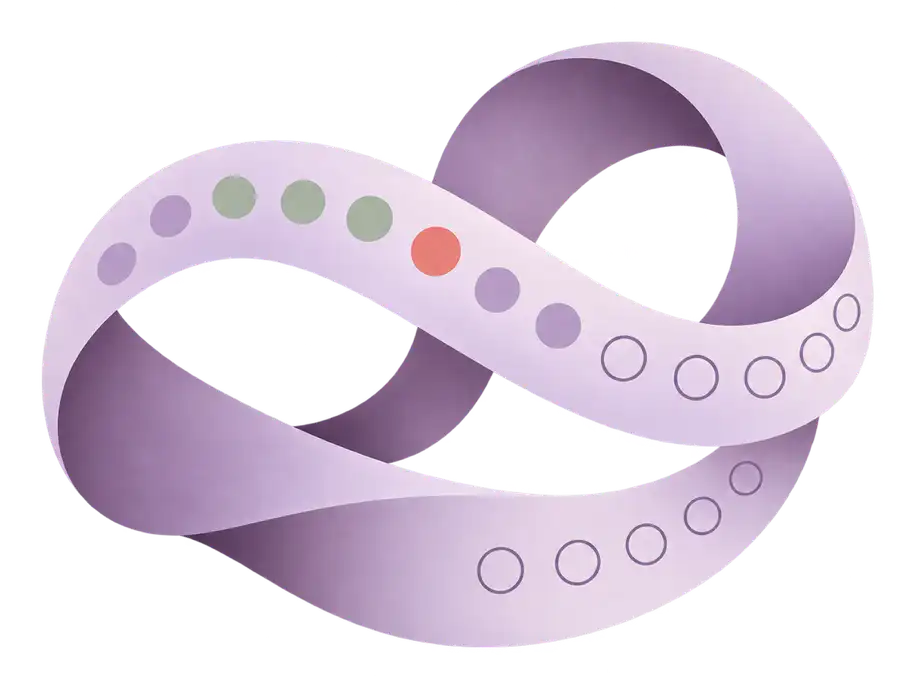
Today opens on the current cycle, drawn as a single ribbon from day 1 to the end of the next estimated period. Logged period days are coral, the estimated fertile window is sage, the next-period window is a soft coral, and today is a small coral dot.
Above the ribbon, the next period is shown as a date range, such as “Next period: 28 Nov – 1 Dec”, with the most likely day and a confidence chip. Below it are four logging tiles: period, symptoms, sex and a check-in. A week strip of day tiles at the top lets you swipe back through earlier weeks.
Further down, a short note for today gives one plain line about where you are, such as your cycle phase or your pregnancy week, with a guide to read more. It changes each day. You can hide it for the day, or turn it off in Settings › App settings.
Logging
Start with the entry you came to make. You might record a period day and leave, or add a note because something felt different. You don’t need to fill in every category.
You can log:
- Period days and flow, or bleeding that isn’t a period day.
- Symptoms, moods, energy and sleep, and how strong a symptom felt.
- Discharge, sex, pregnancy test results and ovulation test results.
- Basal temperature, weight, water and activity minutes.
- Personal notes.
- The pill, ring, patch and injection, including the timing windows of progestogen-only pills.
- After a birth, feeds and nappies as simple counts.
A check-off records what you entered. It doesn’t verify that contraception was used correctly or provide instructions about a missed dose.
Bring your history
If you’ve tracked somewhere else, you can bring that history with you, when you set Ruva up or later in Settings › Your data & devices › Bring your history. Ruva can read:
- an Apple Health export (the export.xml file)
- a data export from Clue, Flo, Natural Cycles, drip. or Mensinator
- a CSV file with a date column and a flow column, including Ruva’s own CSV
- on Android, period history from Health Connect
Ruva reads the file on your device. It isn’t uploaded. Before anything is saved, a preview shows how many periods it found and over which dates, what will be added, what’s already in Ruva, and what will be left out. Period days and flow come across, with entries such as symptoms, moods, spotting, test results, temperatures and notes that match something you can log in Ruva. Settings and anything without a match stay out. If you already have periods in Ruva, you choose whether to add to them or replace them.
Changed your mind? Undo takes out exactly what the import added, straight away or later from the same screen. Anything you’ve edited since is kept.
Estimates
Ruva’s period and fertile-window estimates use your own logged history. Each one is a window, not a promised day. It’s as wide as your cycle lengths vary, and it narrows as you log more cycles. A confidence chip says how much history it’s based on, and “How Ruva estimates” explains the method in plain words.
Three kinds of information should be easy to tell apart:
| Kind | Sample wording | What it means |
|---|---|---|
| Logged entry | Period started · 1 November | A date entered in the sample record. |
| Recorded pattern | Low energy, logged in the 5 days before 2 of your last 3 periods | A count of entries in that history. |
| Estimate | Next period: 28 Nov – 1 Dec · Medium confidence | A possible future window, which may change. |
When your logged basal temperature rises and stays up, Ruva can mark a likely past ovulation. That is different from predicting ovulation, and Ruva doesn’t confirm that an egg was released. You can leave an unusual cycle out of the estimates.
An estimated fertile window must not be used as contraception. It doesn’t guarantee pregnancy, and it can’t show days when pregnancy is impossible.
To learn how these estimates work and why they can be wrong, read how period trackers predict your period and what the fertile window is.
Recorded patterns
A note is useful on its own. Seeing similar notes beside earlier periods may give you something specific to look back at or discuss at an appointment.
Ruva shows a recorded pattern only when an entry was logged in the 5 days before, or during, most of your recent periods. At least 3 periods need entries around them first. For example: “Low energy, logged in the 5 days before 2 of your last 3 periods.” In our sample, lower-energy entries appear before the period that followed August and the one that followed October. The September cycle has none.
Every pattern ends with the same line: patterns describe what you recorded, and they don’t show a cause. A blank day means there’s no entry. It isn’t evidence that you felt fine. There’s more on this in recorded patterns vs predictions.
Cycle recap
When you log the start of a new period, Today offers a short recap of the cycle that just ended: how long it was compared with your usual range, how long your period lasted, how close the estimate was, and the symptoms and moods you logged on more than one day. One plain note goes with it, with a guide to read. Nothing in it is a score or a judgement.
You can share the recap as an image if you want to. You choose what goes on it, and with everything off it simply says one more cycle is noted. The image is made on your device, and Ruva doesn’t receive it. There’s no recap during pregnancy, or in the weeks after a pregnancy loss.
Choose a mode that fits
Today, reminders and estimates follow the mode you choose. These are options, not stages you need to move through, and switching never deletes what you’ve logged.
Cycle
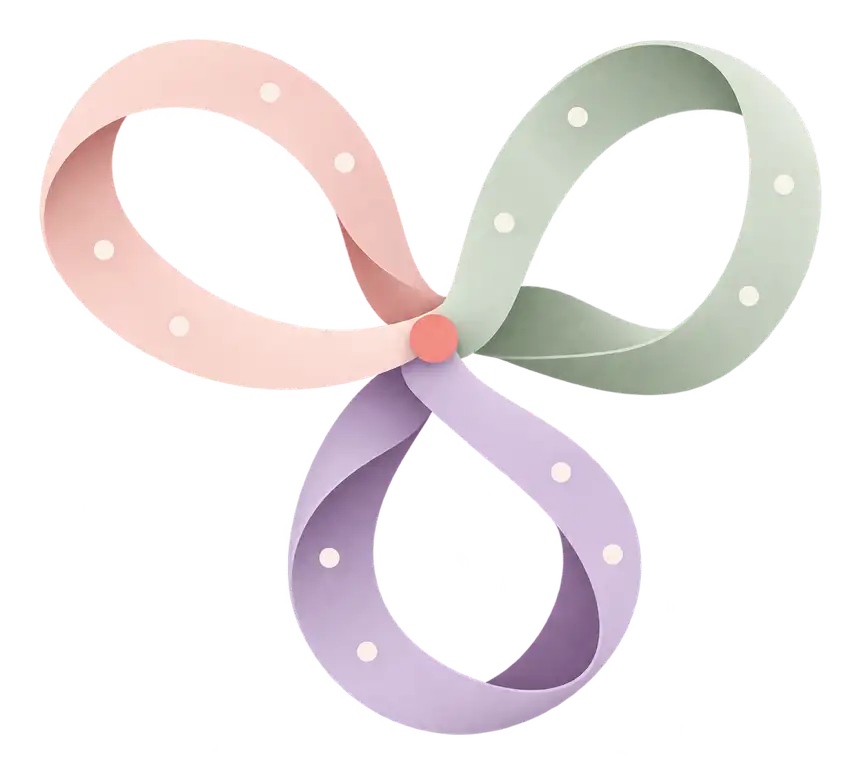
Period history, daily entries, recorded patterns and the next period as an estimated window. Your recent cycles are drawn as ribbons on one scale, so you can see how they vary without being labelled “regular” or “irregular”.
Limits: An estimate isn’t a confirmed date, and a recurring symptom isn’t a diagnosis.
Trying to conceive
Today starts with the estimated fertile window and its six most likely days. Keep ovulation tests, pregnancy tests and temperature readings together. Then work through “Getting ready for pregnancy”: six things that help before you conceive, such as folic acid and checking your MMR vaccination, each with its source.
Limits: Ruva doesn’t detect ovulation, guarantee conception or provide contraception. A temperature rise only shows ovulation after it has happened.
Pregnancy
Cycle estimates pause, and the ribbon spans 40 weeks. A week-by-week guide starts at week 4, alongside:
- When to get help, one tap from Today: the signs to act on, sorted by urgency. The numbers for where you get care, and your own care contacts, are one tap away.
- Baby movements: get to know your baby’s usual pattern, with no kick counting and no reassurance from a count.
- Your care: antenatal appointments and vaccines for the UK, the US or elsewhere.
- A contraction timer from 36 weeks, shown next to the rules for when to call. It never tells you whether you’re in labour.
- Food and drink: a guide you can search.
Limits: This mode doesn’t monitor a pregnancy or replace advice from your maternity care team. If something feels wrong, call, even at night.
After a birth
Estimates pause until your first period after the birth. Bleeding that starts in the first 6 weeks after the birth counts as lochia, so it doesn’t restart them. If you’re sure your period came sooner, you can resume estimates in Ruva’s settings. Today shows:
- Recovery notes that follow the weeks, including after a caesarean.
- An optional weekly mood check: one tap, no score, and not a test. If you choose the answer about thoughts of harming yourself or your baby, Ruva shows who to call straight away.
- Feeds and nappies as simple counts, with no targets.
- When the postnatal check usually happens where you live, and contraception after a birth.
Limits: This doesn’t replace your midwife, health visitor or doctor, and the mood check isn’t a screening tool.
Perimenopause
A transition card follows the gaps between periods and the days with symptoms. Log how strong a symptom felt, and keep track of treatments such as HRT or non-hormonal options alongside them. Contraception guidance follows where you get care, because UK and US advice differ.
Limits: Ruva doesn’t diagnose menopause. Bleeding after menopause always needs checking by a doctor.
Medicines and supplements
Add a medicine or supplement by name, choose when you take it, and turn on a reminder if you want one. Reminders can show a name you choose instead of the medicine, and they come with Taken and Snooze. Presets for pregnancy and menopause come with a short guide.
Ruva never suggests a dose: doses come from your doctor, midwife or pharmacist. Never stop a medicine you’ve been prescribed without checking with them first.
Moving gently
Log activity minutes for the week, follow a guided pelvic-floor routine, and read plain advice about moving safely in pregnancy and after a birth. There are no goals to hit and no badges.
Reminders
Choose the reminders that are useful to you. A prompt should help you remember something you wanted to do, without making an unlogged day feel like an unfinished task. Notifications on a locked screen use neutral wording.
In the browser, reminders show only while Ruva is open in a tab, once you allow notifications. Settings › Reminders shows whether your browser allows them. On iPhone and iPad, add Ruva to your Home Screen first. If a reminder came due while Ruva was closed, a small card shows it when you next open Ruva that day. The Android app, and the iPhone app once it’s out, can remind you when Ruva is closed.
Add to your calendar. In Settings › Reminders, you can put your next six predicted periods, and your fertile windows when your mode shows them, into your own calendar app as an .ics file. Turn on neutral titles and every event is just called “Ruva”. The file is made on your device, and Ruva doesn’t receive it. Estimates change as you log, so add a new file after your next period.
No streak pressure. No scores for having a “good” cycle.
On your home screen
The phone apps keep Ruva one tap away. The Android app has these now, and the iPhone app is coming soon:
- Widgets for Android, iPhone and iPad, and for the Lock Screen on iPhone and iPad. They show your cycle day and next period estimate, or your pregnancy week.
- Shortcuts from the app icon (touch and hold it): log today, period started or ended and, when they apply, pill taken or the contraction timer. On iPhone and iPad these are Home Screen quick actions.
- A Quick Settings tile on Android that shows the day and opens today’s log.
- A mood check-in on the daily logging reminder: tap Happy, Calm or Low energy right from the notification, with Undo.
With discreet mode on, widgets and shortcuts leave out words such as “period” and “pregnancy”. The Quick Settings tile always uses neutral wording, and Lock Screen widgets hide those words while your phone is locked.
Doctor summary
A one-page PDF you can share at an appointment: your cycle lengths and periods, recorded patterns, symptoms, medicines and any notes, over 3, 6 or 12 months. There are versions for pregnancy and after a birth, and a menopause section for perimenopause.
The summary describes recorded information. It doesn’t diagnose a condition or stand in for a clinical assessment. If you’d rather write your own notes, preparing notes for a healthcare appointment shows how to put a useful summary together.
Library
The Library tab holds the same guides as this website’s Learn library: guides in 8 languages, organised by life stage and topic, each with its sources. Every guide says when to get help and how urgently, with notes for where you live. Ruva suggests a guide gently when it’s relevant to what you’ve logged, and you can dismiss a suggestion.
Save a guide to read later, and Ruva keeps your place: an unfinished guide waits under Continue reading. Short courses remember which lessons you’ve done and where to pick up.
Privacy settings
What you log stays on your device, and you don’t need an account. In the web app, that means your browser. It leaves only if you turn on sync between your devices, make a cloud backup, share with a partner or post in the Community. The Community is optional. To join it, link a Google account (on Android or the web), use Sign in with Apple on iPhone, or create an account with your email address and verify it. Your posts show only your display name, and other members never see your email address. Partner sharing is optional too: a private code shares your name and a short summary you choose, and stopping it deletes the shared copy. Without an account, cloud backup keeps a copy that you send by tapping Back up now. With a linked Google, Apple or email account, sync keeps your devices up to date instead. With Google or Apple, Ruva gets only the email address, to recognise the account. With an email account, your name is used only in emails about your account, and Ruva never receives your password. Your cycle data isn’t shared with Google or Apple.
You can download everything at any time as one file, with your periods, entries, notes, medicines, reminders and settings. You can restore it into Ruva on another device without an account. There’s a CSV copy for spreadsheets too, and you can delete everything.
In a browser, clearing your browsing data or using a private window can delete what you’ve logged. Make a cloud backup or download the file to keep a copy.
The phone apps add an app lock: the Android app now, and the iPhone app once it’s out. It asks for your phone’s screen lock, such as your fingerprint, face or PIN, before Ruva opens.
There are no ads, and Ruva doesn’t sell data. It uses Google Analytics for Firebase, with advertising switched off, to see how the app is used, and counts health-related screens itself so they never reach Google. You can switch it off. Read the Privacy Policy for the full details.
Languages
Ruva is in eight languages: English, Spanish, French, German, Brazilian Portuguese, Arabic, Simplified Chinese and Hindi, with the layout mirrored for Arabic.
Free, with optional support
Every feature is free for everyone. There’s no paywall and no premium tier.
If you want to support Ruva, you can pay what you want in the Android app through Google Play, and in the iPhone app through the App Store once it’s out: a monthly amount (suggested $2.99 a month) or a one-time gift. There are no payments on the web. Supporting doesn’t add any features, and you can cancel a monthly amount at any time in your store subscriptions. Stores show prices in your local currency.
Start using Ruva
Ruva works in your browser and on Android now. It’s free, and you don’t need an account. The iPhone, iPad and Mac apps are coming soon.
Open Ruva, get it on Google Play or see all the ways to get Ruva.
Availability
Ruva works in your browser and on Android now, free and with no account. Almost everything is in the browser too. App lock, Health Connect, widgets and shortcuts, a watch app, reminders when Ruva is closed and support payments need a phone app. The Android app has them now, with Wear OS. The iPhone app is coming soon, with Apple Watch. In the browser, reminders show only while Ruva is open in a tab, once you allow notifications.
| Feature | Status |
|---|---|
| Period and flow logging | Available now |
| Symptoms, mood, energy, sleep and notes | Available now |
| Period and fertile-window estimates, with confidence | Available now |
| Recorded patterns in your entries | Available now |
| Cycle recap and a daily note | Available now |
| Trying to conceive mode | Available now |
| Pregnancy week by week | Available now |
| After a birth | Available now |
| Perimenopause | Available now |
| When to get help, with numbers for your region | Available now |
| Medicines and supplements | Available now |
| Gentle activity and pelvic floor | Available now |
| Reminders you choose | Available now |
| Predicted periods in your calendar (.ics) | Available now |
| Widgets, shortcuts and a Quick Settings tile | Android app now, iPhone soon |
| Doctor summary (PDF) | Available now |
| Library of guides in 8 languages, with saved guides and reading progress | Available now |
| Partner sharing | Available now |
| Community (with a linked account) | Available now |
| Cloud backup | Available now |
| Export and restore everything | Available now |
| Import from other apps, with a preview and undo | Available now |
| App lock | Android app now, iPhone soon |
| Eight languages | Available now |
Wondering how Ruva compares with Flo, Clue, Natural Cycles and others? See the comparisons.
Five modes, side by side.
Pick one to see what it changes. You can switch at any time, and none of them leads into another.
Your period history, and what you notice along the way.
Today shows the current cycle as a ribbon: logged period days, the estimated fertile window, and the next period as a window with its confidence. Log what you choose and look back when you need a date.
- Record period days and flow, or mark bleeding as not a period day.
- Add symptoms, mood, energy, sleep or a note when you choose.
- See recorded patterns and your recent cycles side by side.
Estimates can change, and a recorded pattern doesn’t explain a symptom’s cause.
Available nowCycle Sample
- Logged period
- Fertile window, estimated
- Next period, estimated 28 Nov – 1 Dec
Medium confidence · based on 3 cycles
Your recent cycles
- August29 days
- September31 days
- October28 days